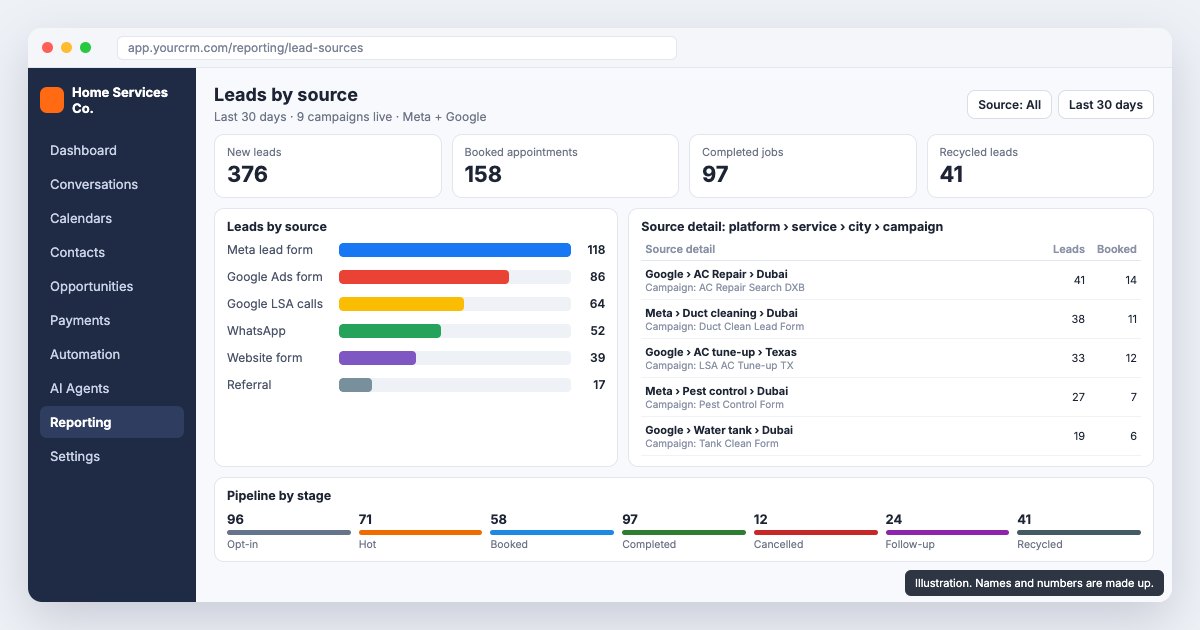
A home services company we are working with runs 8 to 10 ad campaigns at once across Meta and Google, and on a bad day takes 20 to 25 leads in Dubai alone. When they moved to GoHighLevel, the question that mattered most was not about automations. It was which of those campaigns actually turns into booked and completed jobs. A source field that says "Facebook" cannot answer that.
This post covers how we set up lead source tracking in GoHighLevel so it can: what the source fields look like, how each channel fills them, and how the numbers come back out in a dashboard. It is one part of a larger build, which our pillar guide walks through end to end.
Why does "source = Facebook" break lead source tracking?
With one campaign, a platform name is fine. With nine running, "Facebook" puts duct cleaning in Dubai, pest control in Dubai and a retargeting ad into one bucket. You learn that Meta sends a lot of leads and nothing about which ad to cut.
The client's own brief asked for the source to carry detail at four levels, for example Google, then AC Repair, then Dubai, then the campaign name. We build that as four separate fields on the contact rather than one long text string. Separate fields can be filtered, grouped and reported on. A string can only be read.
- Platform: Meta, Google Ads, Google LSA, WhatsApp, Website, Referral.
- Service: the business line, such as AC servicing, duct cleaning, pest control or water tank cleaning.
- City or market: Dubai or Texas for this client.
- Campaign: the campaign name, copied exactly from the ad account.
Two rules keep these fields clean. They are dropdowns, so nobody types "FB" one day and "facebook" the next. And the workflows only write them when they are empty, so first touch wins. A lead that came from a Google ad and later messages on WhatsApp stays a Google lead.
Where does each lead come from, and what does it carry?
| Source | How it enters GoHighLevel | Source fields filled by |
|---|---|---|
| Meta lead form (Facebook, Instagram) | Form submission creates contact and card in Opt-in | Form mapping: one form per campaign |
| Google Ads lead form | Form submission creates contact and card in Opt-in | Form mapping via Google's lead form webhook |
| Google LSA and call extensions | Inbound call to a tracked number; AI voice agent creates the card if no one answers | The number that was dialled |
| WhatsApp, Messenger, Instagram DM | Conversation in the inbox; card logged by a rep, later auto-created | The channel, plus a rep confirming service and campaign |
| Website form | Form submission creates contact and card | UTM parameters read into hidden fields |
| Referral | Rep adds the lead | Rep picks from the dropdown |
How do you track Facebook and Google Ads leads in GoHighLevel?
This is the first trigger in the seven-stage pipeline we build: a new Meta or Google Ads form submission creates the contact and an opportunity card in Opt-in with nobody touching it. Meta lead forms connect through GoHighLevel's Facebook integration. Google Ads lead forms connect through Google's lead form webhook.
The source fields come from the mapping. Each form belongs to one campaign, so the workflow that receives it already knows the platform, service, city and campaign before the lead has said a word. When someone launches a new campaign, adding it to the mapping goes on the launch checklist. Otherwise the new campaign's leads arrive with blank fields and quietly drop out of every report.
How do you track phone call leads by source?
Calls are where source tracking usually breaks, because a caller fills in nothing. In the US this client gets calls from Google Local Services Ads, and on both sides from Google Ads call extensions. We give each major source its own tracked number in GoHighLevel, so the number that was dialled sets the platform field.
Our call setup rings all logged-in sales users at once. If nobody answers in about 10 seconds, an AI voice agent picks up, asks the qualifying questions (service address, number of units, when the ducts were last cleaned) and creates the card in Opt-in with the answers on it. The tracked number's source goes onto that card too. One thing to check on day one: whether the LSA calls actually forward to the GoHighLevel number. If they do not, those leads never reach the CRM at all.
How do WhatsApp and DM leads get a source?
WhatsApp Business, Facebook Messenger and Instagram DMs land in the GoHighLevel conversations inbox. At first a rep logs the lead in Opt-in by hand. Once the native channel is connected, the contact is created automatically. Either way the channel sets the platform, and the rep confirms the service and campaign from the conversation. A website WhatsApp button can open the chat with a prefilled first line naming the service, which saves the rep a question.
Google Business Profile chat is not on this list. Google shut it down in July 2024. Calls from the listing still reach the business number and are handled like any other call.
How do UTM parameters carry the campaign into GoHighLevel?
On the website, UTM parameters do the work. Every ad that points to the site carries utm_source, utm_medium and utm_campaign in its link. Hidden fields on the form read those values and write them into the source fields. Without them, a paid click and an organic visit look the same in the CRM.
Agree the UTM naming once and make it match the dropdown values, so utm_campaign on the ad is the same text as the campaign field on the card. Then test each form with a real submission after every site change, because a form that submits and writes nothing is the most common break we see.
First-touch or last-touch: which source does a lead keep?
We keep the first touch. The source fields are written only when they are empty, so the campaign that produced the lead keeps the credit, even if the same person later clicks a retargeting ad or messages on WhatsApp. For a business deciding which campaigns to cut, that is the number that matters: what brought this lead in.
If you also want to see what brought a lead back, a second set of fields can hold the latest touch and be overwritten on every new form or conversation, while the first set stays locked. Agree which set each report reads before the dashboard is built, so the owner and the ad team are not arguing over two different answers to the same question.
How do you filter the GoHighLevel pipeline by source?
Once the fields exist, the pipeline view filters on any of them. A sales manager can show only Dubai AC repair leads from Google, see which are still sitting in Opt-in, and chase them. The same filters build smart lists for each rep.
Because the pipeline has seven stages (Opt-in, Hot Leads, Booked Appointment, Completed, Cancelled Appointment, Manual Follow-up, Recycled Leads), filtering by source shows how far each campaign's leads get, not only how many arrived. A campaign that fills Opt-in and never reaches Booked is a different problem from one that sends few leads.
What should a GoHighLevel lead source dashboard show?
We build one reporting dashboard with three blocks: leads by source with the campaign breakdown under each platform, the pipeline by stage, and booked and completed appointments by source. This is where lead source tracking pays off, because it answers the owner's question directly: which campaign produced jobs, not just form fills.
One caution. In this pipeline, Completed is set by time: when the appointment time passes and it was not cancelled or rescheduled, the card moves to Completed on its own. If a job did not happen, a rep has to move the card back. Otherwise the dashboard credits the campaign with a job that never took place.
Why don't GoHighLevel numbers match Google Analytics?
They rarely match exactly, and that is fine once you know why. Google Analytics counts what happens on your website. GoHighLevel counts contacts. Phone calls, WhatsApp chats and Meta lead forms never touch the website, so they show up in the CRM and not in Analytics. Visitors who decline cookies can be missing from Analytics too. Duplicates go the other way: one person who submits twice can be two conversions in Analytics and one contact in the CRM.
So we compare like with like. Website form leads in GoHighLevel, grouped by UTM campaign, go against form conversions in Analytics for the same campaigns and dates. Those two should sit close together, and if they drift apart, a form or a hidden field has broken. Meta and Google lead forms are checked against the lead counts in each ad platform instead.
What happens to recycled leads?
Leads that go through five follow-up touches without coming back move to Recycled Leads automatically. Counting the touches needs a number field on the card that each follow-up adds to. Recycled leads are not deleted. Because each one still carries its four source fields, the reactivation campaign can be specific: a duct cleaning offer to Dubai leads who first came from duct cleaning ads, instead of one message to everyone.
The recycled count by campaign is also worth a look before the next budget meeting. A campaign whose leads mostly end up recycled is buying contacts, not jobs.
Common questions
Connect Meta lead forms through GoHighLevel's Facebook integration and Google Ads lead forms through Google's lead form webhook, so each submission creates the contact and the card on its own. Map every form to its campaign so the platform, service, city and campaign fields are filled on arrival.
Yes, if you store the campaign as its own field. We use four dropdown fields (platform, service, city, campaign) filled by form mapping, tracked numbers, the conversation channel or UTM parameters, and only written when empty so the first source is kept.
Add utm_source, utm_medium and utm_campaign to every ad link that points to your site, then add hidden fields to the form that read those values and write them into the contact's source fields. Use the same names in the UTMs as in your dropdowns, and test each form with a real submission after every site change.
Yes. Give each major source its own tracked number, so the number dialled sets the source. Check early that Google Local Services Ads calls actually forward to the GoHighLevel number, or those leads never reach the CRM.
Analytics only sees the website, while GoHighLevel also counts calls, WhatsApp chats and Meta lead forms. Cookie refusals and duplicate submissions widen the gap. Compare website form leads by UTM campaign against Analytics form conversions, and check other sources against the ad platforms.
After five follow-up touches without a reply, move them to a Recycled Leads stage rather than deleting them. Their source fields let you run a reactivation campaign matched to the service and city they first asked about.